
Quickstart: Train a Language Model in 3 Minutes
In this tutorial, you’ll use Backprop to train a small GPT-style transformer (~2.5M parameters) on Shakespeare’s collected works. The model learns to predict the next character given the previous 128 characters, and by the end it generates (vaguely) Shakespearean text.
The whole thing runs in about 3 minutes on an L4 GPU and costs a few cents. Here’s an actual run of this experiment on Backprop, so you can see what to expect.
This example is inspired by Andrej Karpathy’s char-rnn and nanoGPT projects.
Prerequisites
Section titled “Prerequisites”- A Backprop account (sign up here) with a supported provider API key added in your account settings
- The Backprop CLI installed:
pnpm add -g @backprophq/clibp auth loginClone the example
Section titled “Clone the example”Clone the example-shakespeare repo:
cd example-shakespeareuv syncThe two main files are:
├── train.py # ~170 lines, the model, training loop, and metrics logging└── pyproject.toml # just torch as a dependencyLink a Backprop project
Section titled “Link a Backprop project”Create a new project in the Backprop console, then run this command in example-shakespeare/:
bp project set shakespeare-char-lmThis creates a .backpropconfig file in your local copy, linking it to the Backprop project in the console. We recommend checking this file into your repo so collaborators don’t have to repeat this step.
Run the experiment
Section titled “Run the experiment”bp run --gpu l4 train.pyBackprop takes a reproducible snapshot of your code, spins up an L4 GPU, runs the script, and tears it all down when it’s done.
You’ll see output like this:
┌ backprop run train.py│◇ Packaged commit a1b2c3d4│◇ Snapshot #1 created│◇ Experiment #1 created (1x l4)│◇ Instance acquired: runpod — $0.54/hr│└ View logs at https://backprophq.com/experiments/.../logsThe CLI returns once the instance is acquired.
Watch it train
Section titled “Watch it train”Open the Backprop console to see your experiment’s loss curves update in real time. You’ll see the training loss dropping steadily while the validation loss levels off around 1.5.
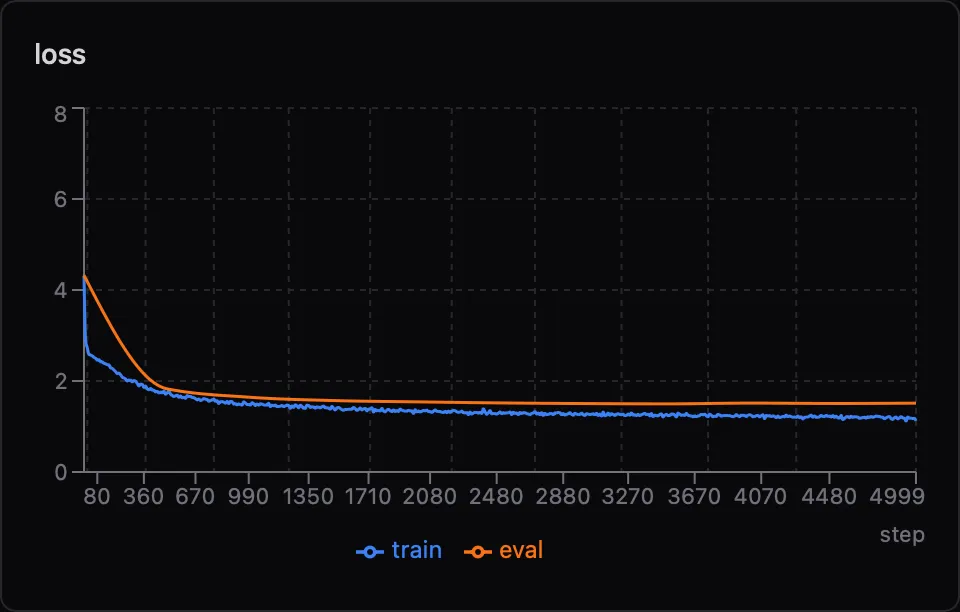
The gap between the two curves is the model overfitting to the small dataset, which is expected and fine for a demo.
Check the output
Section titled “Check the output”After about 3 minutes, the model generates a final 1000-character sample. Here’s a real example from a training run:
ROMEO:And thou shalt they lose more notes,Than use me please yours; be one doth remainPart and your loves his kinsman.
CAPULET:O, I will argue to my guess, if not such.
LADY CAPULET:I'll claim well slander up and grace:The father shome there's news, which they their human,Less hide, sees a traitor to speak.
It’s not going to win any literary awards, but it’s learned a lot in 3 minutes: character names followed by colons, blank lines between speakers, iambic-ish rhythm, and Shakespeare-flavored vocabulary!
You can view the results and download outputs of the experiment in the Backprop console, or with the CLI:
bp results 1bp results 1 --downloadNext steps
Section titled “Next steps”Now that you’ve run your first experiment, a few things to try:
Tweak the hyperparameters. All the knobs are at the top of train.py. Try bumping MAX_STEPS to 10000 for better output, or switch to --gpu a100 for faster training (costs a bit more, but Shakespeare would approve of the dramatic speedup).
Train on your own data. Swap out the Shakespeare URL in train.py for any text file. The character-level approach works on anything.
Run a real project. This example shows the full Backprop workflow: run, monitor, look at results. Backprop handles everything else so you can focus on the research loop. The same pattern works whether you’re training a 2.5M parameter toy model or fine-tuning a 7B parameter LLM.